
In digital marketing and public relations, knowing how people behave, checking how content performs, and spotting new social media trends are no longer “nice to have.” They are basic requirements for strong results.
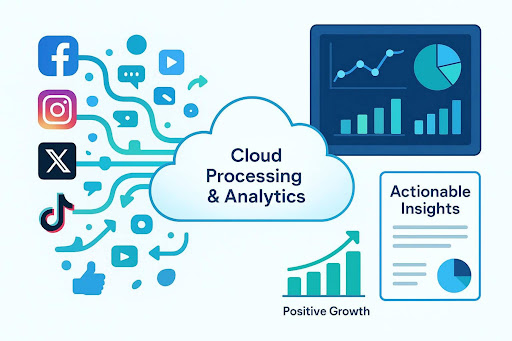
So, how do cloud-based data systems improve social media analytics and reporting? They change how organizations collect, process, and understand the huge amount of data created on social platforms every day.
These systems can scale quickly, support near real-time insights, and offer advanced analysis that many on-site setups cannot match.
For many companies that want to get more value from their online presence, combining strong business cloud storage with analytics is now a practical business need.
What Is a Cloud-Based Data System for Social Media Analytics?
At its core, a cloud-based data system for social media analytics uses remote computing resources to store, process, and analyze large datasets. Instead of using physical servers inside your own office, the system runs in the cloud using services from providers such as AWS, Google Cloud, or Microsoft Azure. This change makes it easier to work at a much larger scale and run modern analysis on complex social media data.
For social media analytics, that means dealing with billions of posts, likes, shares, comments, and videos across platforms like Facebook, Instagram, X, TikTok, and others. Common parts of these systems include data lakes and data warehouses for storage, tools for real-time and scheduled processing, and analysis tools that often use machine learning (ML) and artificial intelligence (AI). The aim is to deliver timely insights for data-based decisions, so teams can turn messy raw data into clear, useful information.
Cloud-Based vs. Traditional On-Premises Analytics: Key Differences
Cloud analytics and on-premises analytics work in very different ways. Traditional analytics depends on equipment and software you buy and run yourself. That often means large upfront costs, plus ongoing work for IT teams to maintain and update systems. Scaling up can be slow and expensive, and it is common to rely on batch processing that can delay insights.
Cloud analytics changes both cost and operations. Many cloud services use a pay-as-you-go pricing model, which lowers upfront spending and lets you increase or decrease resources based on demand. This makes scaling and day-to-day changes much easier. Cloud systems also support faster processing, including near real-time analysis, so insights can arrive quickly. The cloud provider also handles much of the maintenance, so internal teams can spend more time on business priorities instead of server upkeep.
Overall, the cloud approach often reduces costs and maintenance while improving scale, flexibility, and speed.

Benefits of Using Cloud-Based Systems for Social Media Analytics
Moving social media analytics to the cloud is more than a technical upgrade. It can change how a business uses data day to day, improving speed, cost control, and competitiveness.
Scalability To Manage Increasing Data Volumes
Social data is large and keeps growing. On-premises systems can struggle here, because scaling often requires expensive hardware upgrades and time to install and configure new systems.
Cloud platforms are built to scale on demand. You can increase or reduce computing and storage resources based on real needs, without replacing infrastructure. This helps businesses handle busy periods without slowdowns and supports more advanced analysis as data grows. For example, Google Kubernetes Engine (GKE) can scale resources automatically based on metrics you set.
Improved Flexibility and Adaptability
Social platforms change often, including their features and algorithms. Cloud-based systems are easier to adjust when these changes happen. They allow faster processing, faster responses, and simpler testing of new ideas. This helps teams stay current with trends, catch issues earlier, and update campaigns faster.
The option to deploy different tools and models as needed-and even use hybrid approaches for specific data needs-gives a level of flexibility that many traditional systems do not provide.

Cost Efficiency Compared to Legacy Solutions
Cloud analytics is often cheaper than older on-site setups, mainly because you avoid large upfront hardware costs. With pay-as-you-go pricing, you pay for what you use. This can reduce capital spending and let teams spend budgets in more targeted ways. Since providers handle much of the infrastructure maintenance, internal costs can also drop.
As one example, Google’s BigQuery can scale analytics workloads while offering usage-based pricing, storage controls, and cost-management features that help teams manage spend over time.
Faster Time to Insights and Improved Decision-Making
In fast-moving online spaces, speed matters. Cloud analytics can reduce the time between data collection and insight by speeding up processing and supporting real-time analysis. This helps teams make quicker decisions, react to changes more often, and track campaign performance as it happens.
With fewer delays, businesses can spot trends, improve operations, and find opportunities earlier, which supports stronger results and a competitive advantage.
Consolidated Historical Data for Trend Analysis
Many social platforms limit how far back you can view native analytics, and some make fuller analytics available only through business, creator, or paid tools. These limits make it harder to study long-term performance, follower growth, or the lasting impact of campaigns.
Cloud-based systems can solve this by pulling data regularly and saving it in a data warehouse. This creates a long-term record of your metrics that you control, so you can run trend analysis, benchmarking, and planning over longer time periods.

Practical Steps for Implementing Cloud-Based Social Media Analytics
Moving to cloud-based social media analytics can feel overwhelming at first, but it becomes manageable if you follow clear steps.
The goal is to replace manual and disconnected reporting with a more automated and connected system that supports action.
Connecting Social Accounts and Aggregating Data Feeds
The first step is building data pipelines from your social accounts into your cloud setup. This means connecting accounts such as Facebook, Instagram, X, LinkedIn, and TikTok to your analytics tools. Some platforms offer direct integrations, but many teams use third-party connectors.
If the budget is very limited, a manual option is to export data from each platform (often as CSV files) and combine it in a spreadsheet like Google Sheets. This is not live reporting, but it still centralizes data and can be used as a data source for interactive reports if you update it regularly.
For teams handling sensitive marketing data or client information, consider using encrypted cloud storage like Proton to store exported files securely before processing them in your analytics workflows.
Selecting Reporting Tools: Built-in Analytics, Third-Party Platforms, or Custom Solutions
After data feeds are set up, the next choice is which reporting tools to use. Common options include:
- Built-in Analytics: Most platforms provide charts, graphs, and tables inside their own analytics pages. The upside is no extra cost, aside from the time needed to gather and save the stats. You also keep your own saved history if you download it. The downside is manual work per platform, fixed layouts, and little room for context.
- Social Scheduling Tools: Tools such as Hootsuite, Sprout Social, Loomly, or Metricool (which includes a Looker Studio integration at its Advanced tier) can combine data from multiple platforms and create reports. This supports a single view and side-by-side tracking of organic, paid, and earned content. These tools usually require a paid subscription and may limit raw data exports. If you cancel, you may lose dashboard access or access to stored data.
- Custom Data Visualization Tools: Looker Studio (free from Google), Power BI, and Tableau let you create custom dashboards based on your needs. They support flexible design, interactive elements, branding, and written context like recommendations and key takeaways. They can also connect to many data sources beyond social media, giving a broader view that includes other marketing and business data. Setup can take time to learn, but templates and outside support (such as the Digital Culture Network) can help.
Building and Automating Dashboards for Ongoing Reporting
After choosing tools, you can build dashboards and set up automation. This may take testing and adjustments at the start, but it saves time later.
Automated reporting reduces manual work and helps teams check performance more often. It also improves consistency and reduces errors from copy/paste work.
Dashboards can be shared with team members at any time, and some tools allow scheduled email delivery.
Evaluating Platforms Based on Scalability and Business Needs
Before you commit, evaluate each platform based on scale and fit. Estimate how much data you create now and how much you may create later. Check whether the system can scale on demand without expensive upgrades.
Review the tools and skills you already have internally. Agree on which metrics matter for your goals.
Investing in scalable infrastructure and building a data-first way of working helps your analytics setup stay useful over time and grow with the business.

Raghav is a talented content writer with a passion to create informative and interesting articles. With a degree in English Literature, Raghav possesses an inquisitive mind and a thirst for learning. Raghav is a fact enthusiast who loves to unearth fascinating facts from a wide range of subjects. He firmly believes that learning is a lifelong journey and he is constantly seeking opportunities to increase his knowledge and discover new facts. So make sure to check out Raghav’s work for a wonderful reading.